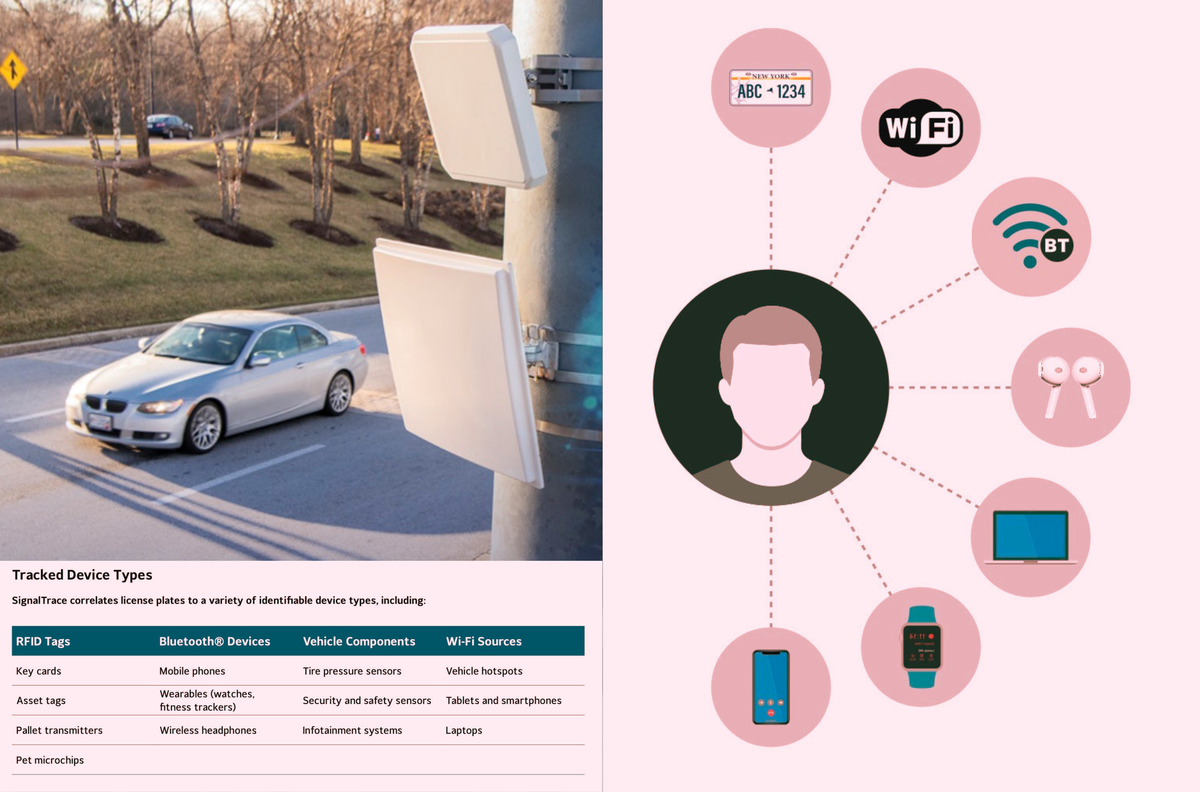
SignalTrace “links devices that regularly travel together, correlating them to license plate.” It is a surveillance product that will sweep up and add all sorts of Bluetooth and other data to license plate readers, linking specific devices—and people—to cars.


BLE would fall under BT, so I would think so. Airplane mode would disable all radios.
https://news.ycombinator.com/item?id=39977355
Does it work on it too?
OK, waaay late to a better response.
If you’re on Android or an alt OS, you can go into developer options > Bluetooth LE Audio Mode it’s defaulted to “Unicast and Broadcast” but I’ve disabled it.
Maybe that’ll help someone!
But can you do it for wearables?
Most wearables I do not believe BLE can be disabled without powering off the device. It’s made me conflicted inside bc I just bought A Nothing Watch 3 and use GadgetBridge, but not if its radio signature is (eventually) going to be used for bad… I can see flock implementing this.
I guess the real issue after thinking on it, there’s no way to disable the wearable’s BLE/BT as those are always on. You might have to power it off to truly disable… According to a few different sites, disabling BT would also disable BLE as is the same chipset, but again that’s only your phone.
Even though I use GadgetBridge for my wearable, I think I’m ready to get rid of it all together. I don’t need to count my steps after all nor heart rate, etc 😅
My old phone is still Android 12, if I enable Airplane mode, WiFi, cell, BT turn off immediately. Idk About newer OSes like that says. You could maybe it’s a different phone with BLE to test scanning for other devices?? Idk, I gotta look into this one now! TY for sharing.